

How to Setup AWS CloudWatch Agent Using AWS Systems Manager
One of the biggest benefits of using AWS Systems Manager is that you can start to standardize your infrastructure configurations, including configuring AWS CloudWatch Agent to consistently report on the data that you are interested in.
eugene evdokimov4 min read
AWS Systems Manager and CloudWatch Agent provide an integrated approach to observability and managing your AWS infrastructure efficiently. In this tutorial, I will show you how to use Systems Manager’s Quick Setup to install CloudWatch Agent on your EC2 Instances.
What is AWS Systems Manager?
AWS Systems Manager is an operations hub for your AWS resources that allows you to group, view, and act on resources within your AWS environment.
With Systems Manager, you can execute commands on your EC2 instances without logging into each instance separately, and ensure that your instances remain in a desired state by applying patches, updates, and configuration changes automatically. You can store and manage configuration data and secrets, such as database passwords or API keys, and have a centralized location to view, investigate, and resolve operational issues related to AWS resources.
Note that some features contained within AWS Systems Manager may incur additional costs. Make sure you check the costs tied to your use case before getting started.
Why you need to set up AWS CloudWatch Agent with AWS Systems Manager
While you can SSH into an EC2 instance and set up the AWS CloudWatch Logs Agent via the command line, it isn’t exactly a scalable process. Repeating those manual steps for dozens of servers takes a great deal of time and is prone to human error. This is where AWS Systems Manager comes into play:
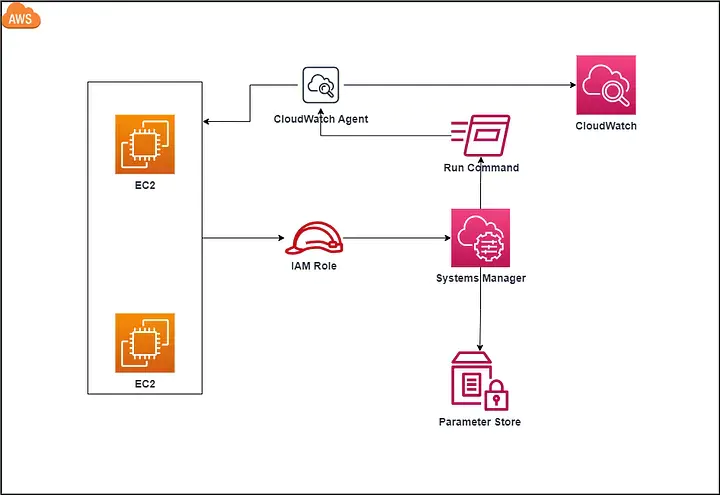
Installing the CloudWatch Agent via AWS Systems Manager reduces the effort significantly and ensures that all your machines are controlled from a top-down approach rather than an error-prone bottom-up approach.
You will be able to securely connect to a managed EC2 instance without worrying about SSH key management and/or opening ports on your firewalls/security groups. You will also see CloudWatch metrics along with any alarms you have configured via AWS CloudWatch. This will happen automatically, without having to configure each instance with the specific metrics that you want to collect!
How To Install AWS CloudWatch Agent Using AWS Systems Manager Quick Setup
If you are already using Systems Manager, please refer to the AWS documentation.
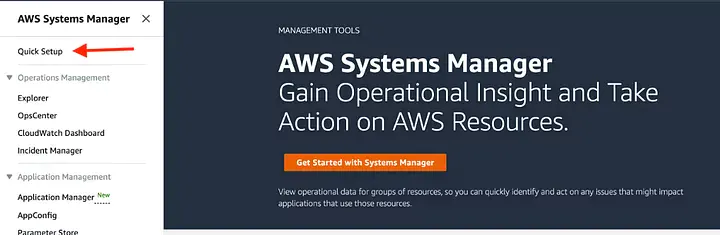
If you aren’t already using Systems Manager, you can use the Quick Setup feature:
Select host management configuration type
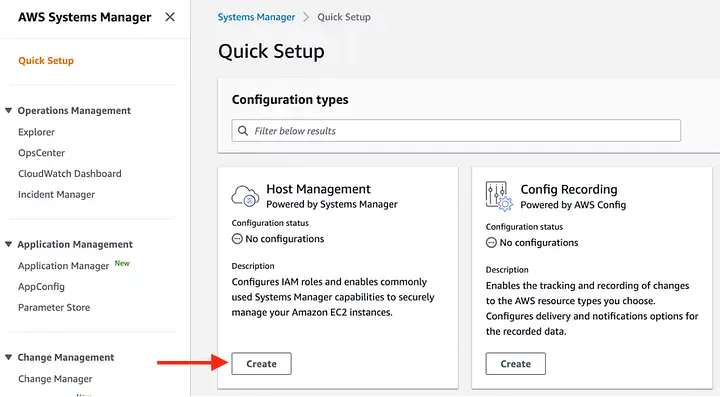
Select option to install AWS CloudWatch Agent
In the next screen, check the boxes under the Amazon CloudWatch section and click continue.
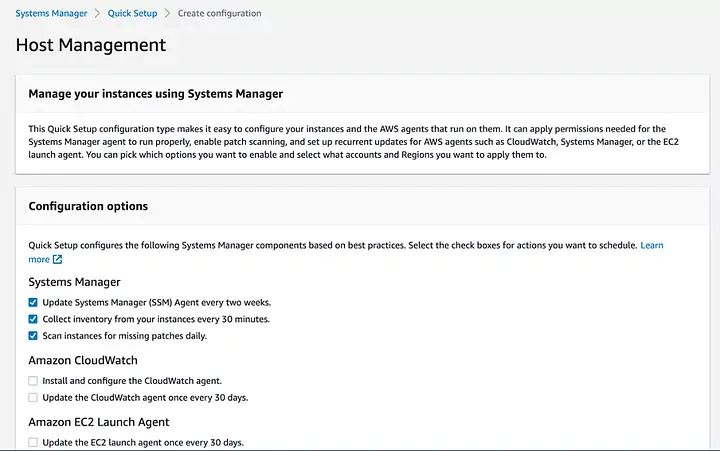
Select a target instance
This screen will allow you to choose the instances on which you want to install AWS Systems Manager Agent and CloudWatch Agent. Start with a single instance to test your configuration and add more once you feel comfortable.
All done!
Once you’ve successfully run through the setup process, you should be able to access your dashboard.
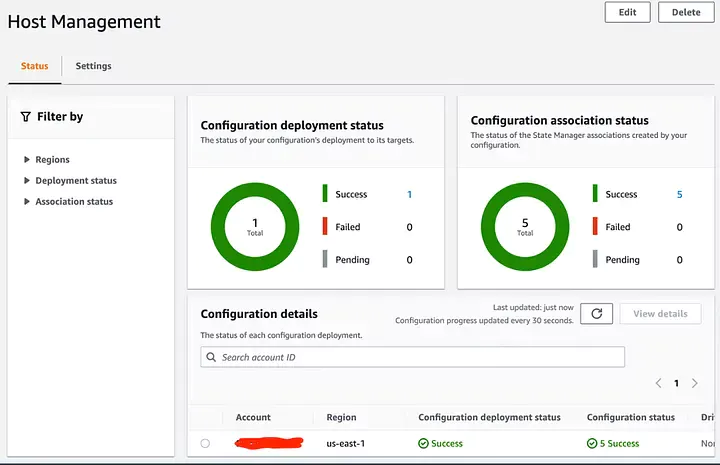
You should start to see metrics being collected via the CloudWatch Agent that is now installed on your instance(s). Out of the box, this process will collect a basic set of metrics and you will need to edit the CloudWatch Agent Configuration file if you want to customize these.
Wrapping Up
You now know how to install AWS CloudWatch Agent consistently across your infrastructure! This is an important step to boost your observability data and become proactive in managing your systems.
Systems Manager boasts a lot of other useful features, such as Patch Manager to automatically patch your managed instances with security updates, or Automation to streamline repetitive tasks. Make sure you explore these features to enhance your infrastructure management on AWS.
Keep reading
 AWSAWS GuardDuty Modules Explained: Features, Coverage, and How Customers Benefit with CoralogixExplore all AWS GuardDuty protection modules and learn how integrating findings into Coralogix Security Analytics helps SOC teams detect and respond to cloud threats faster.
 AlertsMastering OWASP Detection: Enterprise Rules for AWS, Akamai, F5, and Cloudflare
 Company newsCoralogix’s Guide for AWS re:Invent 2025Coralogix will be in attendance at the 2025 AWS re:Invent conference. Here's a preview of what we have in store for the week.