---
title: Archive query from the explore screen
description: Archive Query enables you to directly query your logs from your S3 archive using any text or Lucene or DataPrime syntax query. Query logs from your Explore Screen irrespective of log priority, daily quota, or the time frame of the data - all with the ease of familiar functionalities.
url: https://coralogix.com/docs/user-guides/data-query/archive-query/archive-query-from-the-explore-screen/
product: dataengine
feature: DataPrime Queries
feature_id: dataengine-dataprime-queries
feature_identifier: dataengine/dataengine-dataprime-queries
last_updated: '2026-08-17'
---
# Archive query from the explore screen
Directly query logs and spans in your S3 archive from your **Explore Screen**. Using text-based queries or specific query languages such as DataPrime or Lucene, you may query your data irrespective of its priority or timeframe and regardless of your daily quota - all with the ease of familiar functionalities.
## What you need
* To query data from the S3 archive, you need `LEGACY-ARCHIVE-QUERIES:EXECUTE` (included in all standard roles).
* To reindex archive query results, you need `LEGACY-ARCHIVE-QUERIES:REINDEX` (Data Admin or Platform Admin only).
## Overview
Query the data in your S3 archive directly from your [Explore screen](https://coralogix.com/docs/user-guides/data_exploration.md).
Use this feature to:
* Query your archive in the Coralogix UI using any text, [Lucene](https://coralogix.com/docs/user-guides/alerting/lucene-query-builder.md), or [DataPrime](https://coralogix.com/docs/dataprime/introduction/welcome-to-the-dataprime-reference.md) syntax query, irrespective of log priority or daily quota.
* Enjoy various data sources. Using [DataPrime](https://coralogix.com/docs/dataprime/introduction/welcome-to-the-dataprime-reference.md), you may query logs or spans.
* Query data with unlimited time frames. There are no restrictions on how far back in time your data can go.
* View query results alongside live data streams and with the use of familiar functionalities.
* Store more of your data in our [Monitoring](https://coralogix.com/docs/user-guides/account-management/tco-optimizer.md#features-by-priority-level) and [Compliance](https://coralogix.com/docs/user-guides/account-management/tco-optimizer.md#features-by-priority-level) priority levels, while maintaining interactive query times and saving on costs.
## Prerequisites
* Read/ Write permissions enabled in your [AWS S3 bucket](https://coralogix.com/tutorials/archive-s3-bucket-forever/)
## Getting started
1
.
From your Coralogix toolbar, navigate to **Explore** > **Logs** tab.
2
.
Select **Archive** the upper left-hand corner of your Logs screen.
3
.
Select **CX-Data** in the dropdown menu.
## Explore screen functionalities
### Query
[Query](https://coralogix.com/docs/user-guides/data_exploration.md) using any text, [Lucene](https://coralogix.com/docs/user-guides/alerting/lucene-query-builder.md), or [DataPrime](https://coralogix.com/docs/dataprime/introduction/welcome-to-the-dataprime-reference.md) syntax query.
### Filter
[Filter](https://coralogix.com/docs/user-guides/data_exploration.md) your logs using application, subsystem, and severity filters.
### Manage settings
Manage your settings by clicking on **SETTINGS** in the upper right-hand corner of your screen.
Select **ACTIONS** to trigger 3rd party services based on your search results and / or values under specific keys. Find out more [here](https://coralogix.com/docs/user-guides/data_exploration/custom_actions.md).
## Limitations
The following limitations on Explore Screen archive queries are described below.
| Limitation | Description |
| --------------------- | ----------------------------------------------------------------------------------------------------------------------------------------------------------------------------------------------------------------------------------------------------------------------------------------------------- |
| Bytes processed | Up to 30% of daily ingested bytes |
| Parquet files scanned | Up to 500,000 files |
| Total log results | 2,000 default
30,000 using `limit `
5,000 with frequent search analytical query (i.e. aggregation)
15,000 frequent search exploratory query (non-aggregation) |
| Exported log results | Up to 2,000 results.
Exporting the data in the logs grid from an archive query is limited to the top 20 pages (100 logs per page), so you can export a max of 2000 logs at a time. In order to export all archive query logs, create an archive query by navigating Data Flow > Archive Queries. |
| Ordering | Archive query ordering is guaranteed only for up to 10,000 results. |
[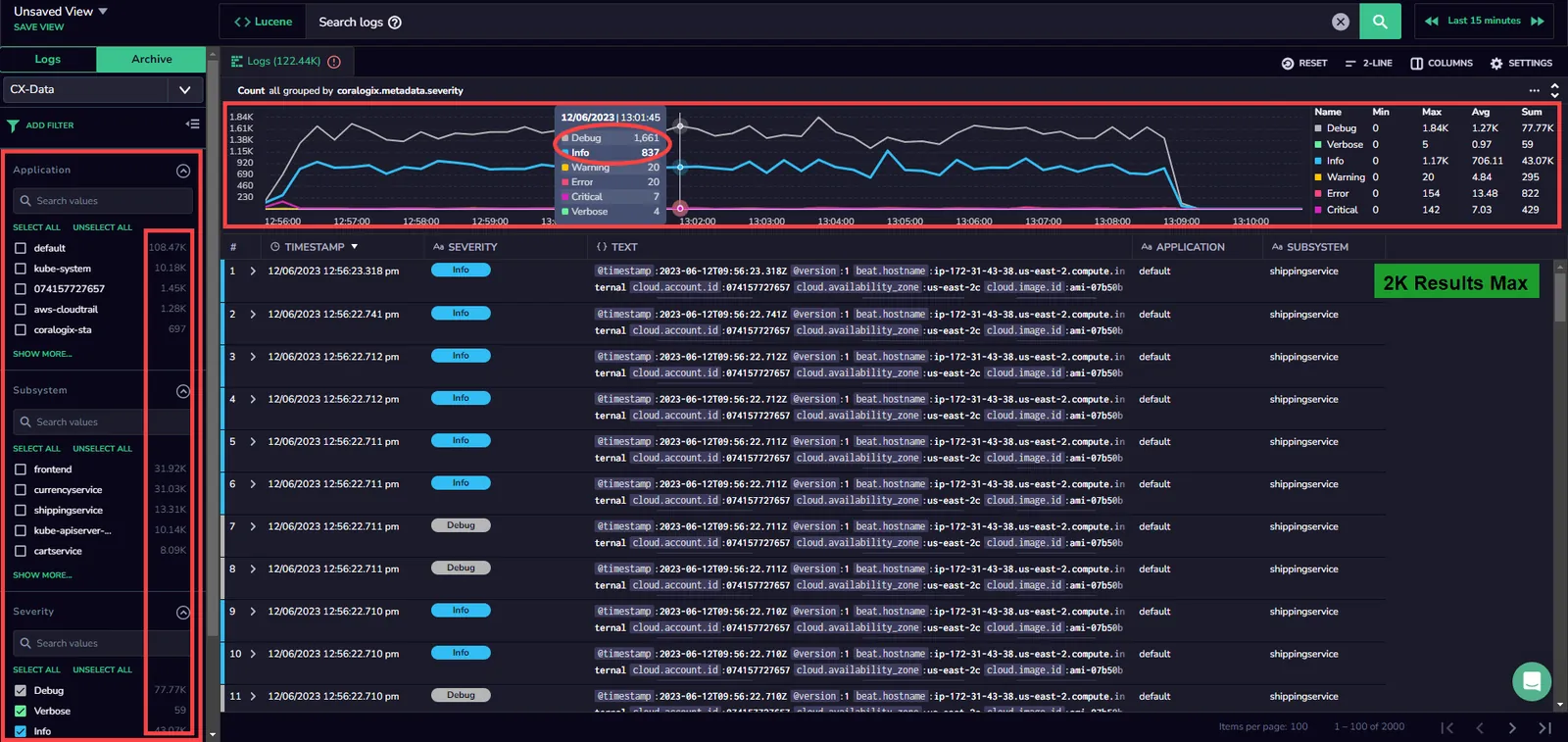](https://coralogix.com/docs/assets/images/Untitled-34-607db6fca1af71e4f5dcdb3f5f00b09f.webp)
Note
* You may incur slight delays when querying archived data, when compared with other Explore screen queries.
* It is possible to use the same query syntax as queries run in [Background Queries](https://coralogix.com/docs/user-guides/dataengine/background_queries_v1.md)
See the [limitations](https://coralogix.com/docs/dataprime/API/limitations.md#background-query-limitations) page for a comprehensive list of query limitations.
### Warnings
Once a limit is reached, a warning message is displayed. Refine your query results to avoid reaching a limit.
## Refine your query results
Refine your query results using any of the following methods:
* Apply more selective filters to your queries (for example, on application or subsystem).
* If using the DataPrime extract operator and subsequently filtering its results, create a parsing rule and filter on the parsed field instead.
* Avoid regular expressions or wildcards in filters.
* In DataPrime, switch from using the contains operator on strings to the free text search operator (\~).