---
title: Spinnaker Version Tags
description: "Coralogix provides seamless integration with\_Spinnaker\_so you can push tags from your pipelines."
url: https://coralogix.com/docs/developer-portal/apis/version-tags/spinnaker-version-tags/
product: cicd
feature: Version Tags
feature_id: version-tags
feature_identifier: cicd/version-tags
last_updated: '2026-10-12'
---
# Spinnaker Version Tags
Coralogix provides seamless integration with `Spinnaker` deployment pipelines so you can push tags to Coralogix automatically from your pipelines.
## Prerequisites
* Have `Spinnaker` deployed, for more information on how to deploy:
* API Token - To use this API you need to [create](https://coralogix.com/docs/user-guides/account-management/api-keys/api-keys.md) a personal or team API key. It’s recommended to use permission presets, as they are automatically updated with all relevant permissions. Alternatively, you can manually add individual permissions.
| Preset | Action | Description |
| --------------- | --------------------------------------------------------------------------------------------------------- | -------------------------------------------------------------------------------------------------- |
| CICDIntegration | `VERSION-BENCHMARK-TAGS:READ`
`VERSION-BENCHMARKS-REPORTS:READ`
`VERSION-BENCHMARK-TAGS:UPDATE` | View Version Benchmark Tags
View Version Benchmark Reports
Modify Version Benchmark Tags |
## [](https://github.com/coralogix/integrations-docs/blob/master/integrations/spinnaker/README.rst#configuration)Configuration
To create a custom webhook stage, you'll need to add configuration for the stage in `orca-local.yml`.
Choose the https\://api./api/v1/external/tags endpoint that corresponds to your Coralogix [domain](https://coralogix.com/docs/user-guides/account-management/account-settings/coralogix-domain.md) using the domain selector at the top of the page.
Here is the content of **orca-local.yml**:
```
webhook:
preconfigured:
- label: Coralogix Tag
type: coralogixTag
enabled: true
description: Push tag to Coralogix
parameters:
- label: Coralogix API URL
name: url
type: string
description: Coralogix API endpoint
defaultValue: coralogix.com
- label: Coralogix API Token
name: token
type: string
description: Coralogix API Token
- label: Tag
name: tag
type: string
description: Tag Name
- label: Application
name: application
type: string
description: Application Name
- label: Subsystem
name: subsystem
type: string
description: Subsystem Name
url: https://api.eu2.coralogix.com/api/v1/external/tags
method: POST
customHeaders:
Authorization:
- Bearer ${parameterValues['token']}
Content-Type:
- application/json
payload: |-
{
"name": "${parameterValues['tag']}",
"application": ["${parameterValues['application']}"],
"subsystem": ["${parameterValues['subsystem']}"],
"iconUrl": "https://raw.githubusercontent.com/coralogix/integrations-docs/master/integrations/spinnaker/images/spinnaker.png"
}
```
After you create a custom configuration, redeploy your `Spinnaker` instance with `Halyard`:
```
hal deploy apply
```
## [](https://github.com/coralogix/integrations-docs/blob/master/integrations/spinnaker/README.rst#usage)Usage
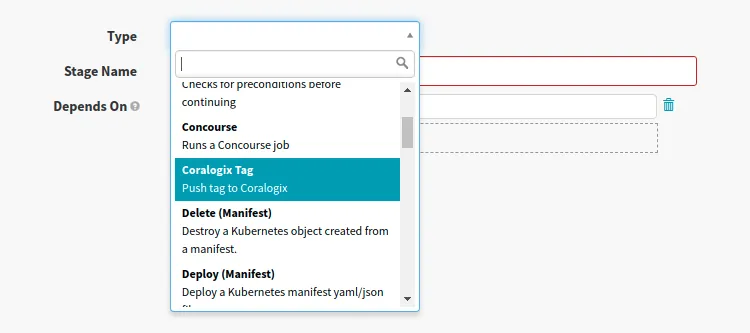
Add a new stage to push the tag to *Coralogix*:
[](https://github.com/coralogix/integrations-docs/blob/master/integrations/spinnaker/images/1.png)
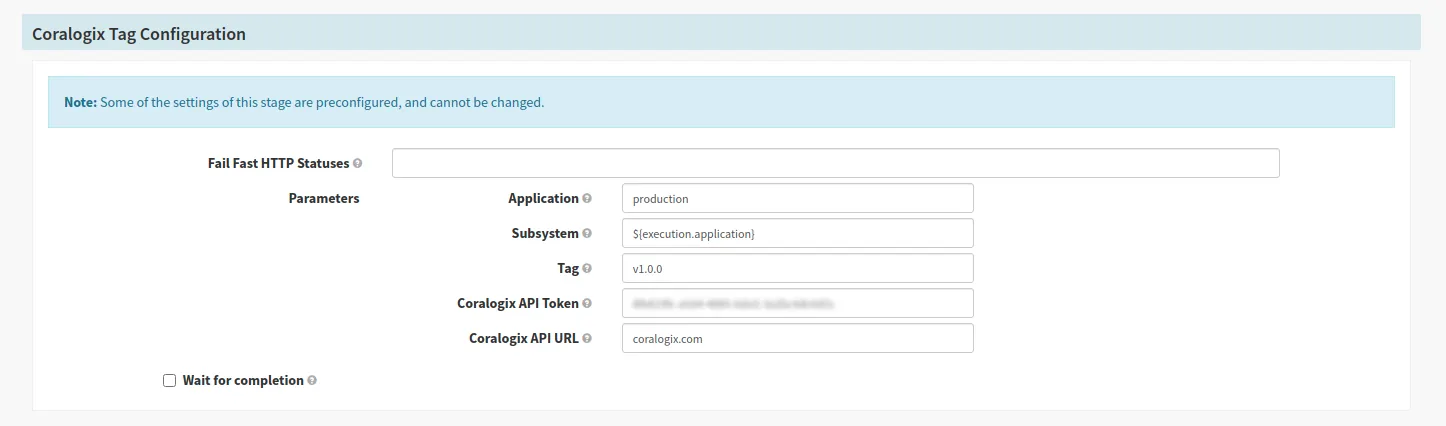
Configure stage to push tag to your account:
[](https://github.com/coralogix/integrations-docs/blob/master/integrations/spinnaker/images/2.png)
**Note:** You can use Spinnaker [pipeline expressions](https://spinnaker.io/reference/pipeline/expressions/) to define parameters for the tag.
## Send deployment events
Send each deployment to the Coralogix ops events API as well, and it appears as an [event marker](https://coralogix.com/docs/user-guides/apm/features/event-markers.md) on your APM charts, so you can line a latency or error-rate change up with the pipeline execution that caused it.
### What you need
* A **Send Your Data** [API key](https://coralogix.com/docs/user-guides/account-management/api-keys/api-keys.md#create-an-api-key) with the **OpsEvents** role preset. The ops events API rejects any other key type or preset, including the `CICDIntegration` key used for version tags, with `403 Forbidden`.
* The ops events endpoint for your Coralogix [domain](https://coralogix.com/docs/user-guides/account-management/account-settings/coralogix-domain.md). Use the domain selector at the top of this page to resolve it:
https\://ingress./v1/ops-events
* The service name and environment exactly as they appear in APM. They must equal the `service.name` and `deployment.environment.name` resource attributes your service reports. An event that matches no service is still stored, but appears only under **All events**.
### Add a preconfigured webhook stage
Add a second preconfigured webhook to `orca-local.yml`, next to the version tag webhook. Replace `` with the ops events API key; it stays in the Orca configuration, so pipelines never carry it.
```
webhook:
preconfigured:
- label: Coralogix Deployment Event
type: coralogixOpsEvent
enabled: true
description: Send a deployment event to Coralogix
parameters:
- label: Service name
name: service
type: string
description: Service name as it appears in Coralogix APM
- label: Environment
name: environment
type: string
description: Environment name as it appears in Coralogix APM
- label: Spinnaker URL
name: spinnakerUrl
type: string
description: Base URL of your Spinnaker UI, used to link back to the execution
url: https://ingress.eu2.coralogix.com/v1/ops-events
method: POST
customHeaders:
Authorization:
- Bearer
Content-Type:
- application/json
payload: |-
{
"opsEvent": {
"timestamp": "${T(java.time.Instant).now().toString()}",
"description": "${parameterValues['service']} deployed to ${parameterValues['environment']} by ${execution.name}",
"attributes": {
"service": { "name": "${parameterValues['service']}" },
"environment": "${parameterValues['environment']}"
},
"cdEvent": {
"system": "CD_SYSTEM_SPINNAKER",
"pipeline": {
"name": "${execution.name}",
"run": {
"id": "${execution.id}",
"url": "${parameterValues['spinnakerUrl']}/#/applications/${execution.application}/executions/details/${execution.id}"
},
"result": { "status": "PIPELINE_RESULT_STATUS_SUCCESS" }
}
}
}
}
```
Redeploy Spinnaker with `hal deploy apply`, then add a **Coralogix Deployment Event** stage after your deploy stage and fill in the service name and environment from APM. The stage runs only when the stages before it succeed, so each event marks a completed deployment.
A successful request returns the server-generated event `id`. The marker then appears on the service's APM charts; see [Event markers](https://coralogix.com/docs/user-guides/apm/features/event-markers.md) for how to show it and for the full field reference. The API rejects a `timestamp` more than 24 hours from the time the request is received, so send the event from the pipeline as it runs rather than backfilling.
## Additional resources
| | |
| ------------------- | ------------------------------------------------------------------------------------- |
| Coralogix Endpoints | [Coralogix Endpoints](https://coralogix.com/docs/integrations/coralogix-endpoints.md) |