---
title: GitLab version tags
description: Use a GitLab pipeline webhook to tell Coralogix when a new build ships, so version benchmarks line up with your deployments.
url: https://coralogix.com/docs/developer-portal/apis/version-tags/gitlab-version-tags/
product: cicd
feature: Version Tags
feature_id: version-tags
feature_identifier: cicd/version-tags
last_updated: '2026-10-12'
---
# GitLab version tags
Tell Coralogix when a new build ships, straight from your [GitLab](https://coralogix.com/docs/integrations/contextual-data/gitlab-data-ingestion.md) deployment pipeline. A pipeline webhook creates a version tag, which is what version benchmark reports compare behavior across.
## What you need
* Access to your GitLab project's settings.
* A personal or team [API key](https://coralogix.com/docs/user-guides/account-management/api-keys/api-keys.md) with the `CICDIntegration` preset. Presets pick up new permissions automatically; individual permissions have to be maintained by hand.
* The GitLab version tags endpoint for your Coralogix [domain](https://coralogix.com/docs/user-guides/account-management/account-settings/coralogix-domain.md). Use the domain selector at the top of this page to resolve it:
https\://api./api/v1/external/gitlab
| Preset | Actions | Grants |
| --------------- | --------------------------------------------------------------------------------------------------------- | -------------------------------------------------------------------------------------------------- |
| CICDIntegration | `VERSION-BENCHMARK-TAGS:READ`
`VERSION-BENCHMARKS-REPORTS:READ`
`VERSION-BENCHMARK-TAGS:UPDATE` | View version benchmark tags
View version benchmark reports
Modify version benchmark tags |
## Add the webhook in GitLab
1
.
Open the webhook settings
Sign in to GitLab, open your project, then select **Settings**, then **Webhooks**.
2
.
Enter the URL
Build the URL from the GitLab endpoint for your domain and the query parameters below.
```
https://api.eu2.coralogix.com/api/v1/external/gitlab?application=APPLICATION_NAME&subsystem=SUBSYSTEM_NAME&name=TAG_NAME
```
| Parameter | What to enter |
| ------------- | -------------------------------------------------------------------------------------------------------------------------------------------------------------------------------------------------------------------------------------------- |
| `application` | [Application name](https://coralogix.com/docs/user-guides/account-management/account-settings/application-and-subsystem-names.md) as it appears in your Coralogix UI |
| `subsystem` | [Subsystem name](https://coralogix.com/docs/user-guides/account-management/account-settings/application-and-subsystem-names.md) as it appears in your Coralogix UI. Separate multiple names with commas |
| `name` | The tag name. Omit it and Coralogix derives one from the GitLab payload's `project.name` and `object_attributes.ref` fields. See [pipeline events](https://docs.gitlab.com/ee/user/project/integrations/webhook_events.html#pipeline-events) |
3
.
Add the secret token
Enter your API key in **Secret Token**, below the URL. This field is required. GitLab sends it in the `X-Gitlab-Token` header, and Coralogix rejects requests without it.
4
.
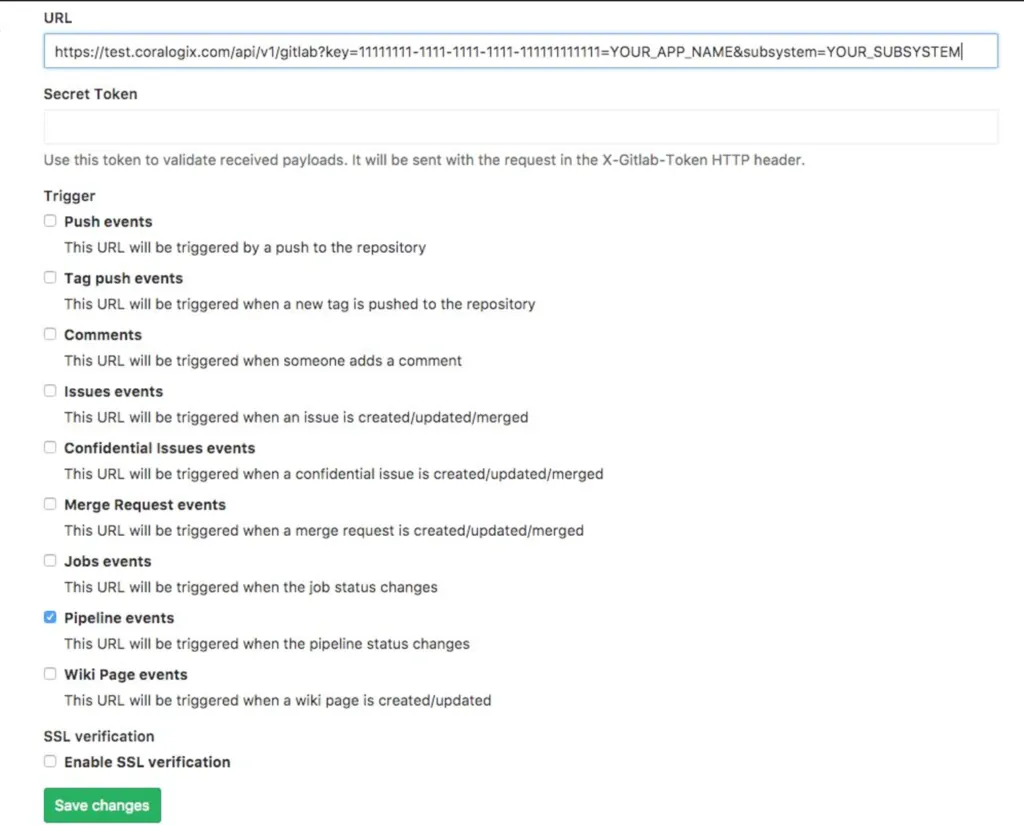
Trigger on pipeline events
Under **Trigger**, select **Pipeline events**, then select **Save changes**.
[](https://coralogix.com/docs/assets/images/Screen-Shot-2017-06-04-at-22.07.28-1024x825-554656530f3fabaa95ec8ba62d39c862.webp)
Shows the trigger that fires a version tag each time a pipeline's status changes.
## Send deployment events
Send each deployment to the Coralogix ops events API as well, and it appears as an [event marker](https://coralogix.com/docs/user-guides/apm/features/event-markers.md) on your APM charts, so you can line a latency or error-rate change up with the pipeline that caused it.
### What you need
* A **Send Your Data** [API key](https://coralogix.com/docs/user-guides/account-management/api-keys/api-keys.md#create-an-api-key) with the **OpsEvents** role preset. The ops events API rejects any other key type or preset, including the `CICDIntegration` key used for version tags, with `403 Forbidden`.
* The ops events endpoint for your Coralogix [domain](https://coralogix.com/docs/user-guides/account-management/account-settings/coralogix-domain.md). Use the domain selector at the top of this page to resolve it:
https\://ingress./v1/ops-events
* The service name and environment exactly as they appear in APM. They must equal the `service.name` and `deployment.environment.name` resource attributes your service reports. An event that matches no service is still stored, but appears only under **All events**.
### Add the event to your deploy job
Store the API key as a masked CI/CD variable named `CX_OPS_EVENTS_API_KEY`, then add an `after_script` to your deploy job. `after_script` runs whether the job succeeds or fails, and `CI_JOB_STATUS` carries the result. The job image must include `curl`.
```
deploy-production:
stage: deploy
environment: production
variables:
SERVICE_NAME:
script:
- ./deploy.sh
after_script:
- |
case "$CI_JOB_STATUS" in
success) STATUS=PIPELINE_RESULT_STATUS_SUCCESS ;;
canceled) STATUS=PIPELINE_RESULT_STATUS_CANCELLATION ;;
*) STATUS=PIPELINE_RESULT_STATUS_FAILURE ;;
esac
if [ -n "$CI_COMMIT_TAG" ]; then REF_TYPE=VCS_REF_TYPE_TAG; else REF_TYPE=VCS_REF_TYPE_BRANCH; fi
curl -sS --fail-with-body -X POST 'https://ingress.eu2.coralogix.com/v1/ops-events' \
-H "Authorization: Bearer $CX_OPS_EVENTS_API_KEY" \
-H 'Content-Type: application/json' \
--data-binary @- <` with the service name from APM. The example takes the environment from the job's `environment` keyword, so set that to the environment name APM shows, or replace `$CI_ENVIRONMENT_NAME` with a literal value.
A successful request returns the server-generated event `id`. The marker then appears on the service's APM charts; see [Event markers](https://coralogix.com/docs/user-guides/apm/features/event-markers.md) for how to show it and for the full field reference. The API rejects a `timestamp` more than 24 hours from the time the request is received, so send the event from the pipeline as it runs rather than backfilling.
## Related resources
[GitLab data ingestion](https://coralogix.com/docs/integrations/contextual-data/gitlab-data-ingestion.md)[API keys](https://coralogix.com/docs/user-guides/account-management/api-keys/api-keys.md)[Coralogix endpoints](https://coralogix.com/docs/integrations/coralogix-endpoints.md)