---
title: Bitbucket Version Tags
description: Coralogix supports integration with BitBucket webhooks, use webhooks to inform Coralogix when a new build is issued.
url: https://coralogix.com/docs/developer-portal/apis/version-tags/bitbucket-version-tags/
product: cicd
feature: Version Tags
feature_id: version-tags
feature_identifier: cicd/version-tags
last_updated: '2026-10-12'
---
# Bitbucket Version Tags
Coralogix supports integration with [`Bitbucket`](https://confluence.atlassian.com/bitbucketserver/manage-webhooks-938025878.html) webhooks, which can be used to inform Coralogix when a new build has been issued.
## API endpoint
Choose the https\://api./api/v1/external/bitbucket endpoint that corresponds to your Coralogix [domain](https://coralogix.com/docs/user-guides/account-management/account-settings/coralogix-domain.md) using the domain selector at the top of the page.
## Configuration
1. Log into Bitbucket using your user credentials.
2. Click your desired Repository to select it.
3. Click "Repository settings" on the left.
4. Under General \ Repository details, click "Webhooks".
5. Click "Add webhook".
6. Add a Title (for example: "Coralogix builds").
7. In the URL box, enter the https\://api./api/v1/external/bitbucket endpoint that corresponds to your Coralogix [domain](https://coralogix.com/docs/user-guides/account-management/account-settings/coralogix-domain.md).
**URL Parameters**
* API endpoint
* To use this API you need to [create](https://coralogix.com/docs/user-guides/account-management/api-keys/api-keys.md) a personal or team API key. It’s recommended to use permission presets, as they are automatically updated with all relevant permissions. Alternatively, you can manually add individual permissions.
| Preset | Action | Description |
| --------------- | --------------------------------------------------------------------------------------------------------- | -------------------------------------------------------------------------------------------------- |
| CICDIntegration | `VERSION-BENCHMARK-TAGS:READ`
`VERSION-BENCHMARKS-REPORTS:READ`
`VERSION-BENCHMARK-TAGS:UPDATE` | View Version Benchmark Tags
View Version Benchmark Reports
Modify Version Benchmark Tags |
* Application Name:
* Enter your desired Application name. Please use a name corresponding to your logs "Application" name.
* Subsystem Name:
* Enter your desired Subsystem name. Please use a name corresponding to your logs "Subsystem" name.
* You can specify more than 1 Subsystem name, separated by a commas.
* Tag Name
**URL Example**
`https://api.eu2.coralogix.com/api/v1/external/bitbucket/?application=bitbucket&subsystem=build-tag-test&name=bitbucket-tag-test`
* Under "Triggers", please select Build status updated".
[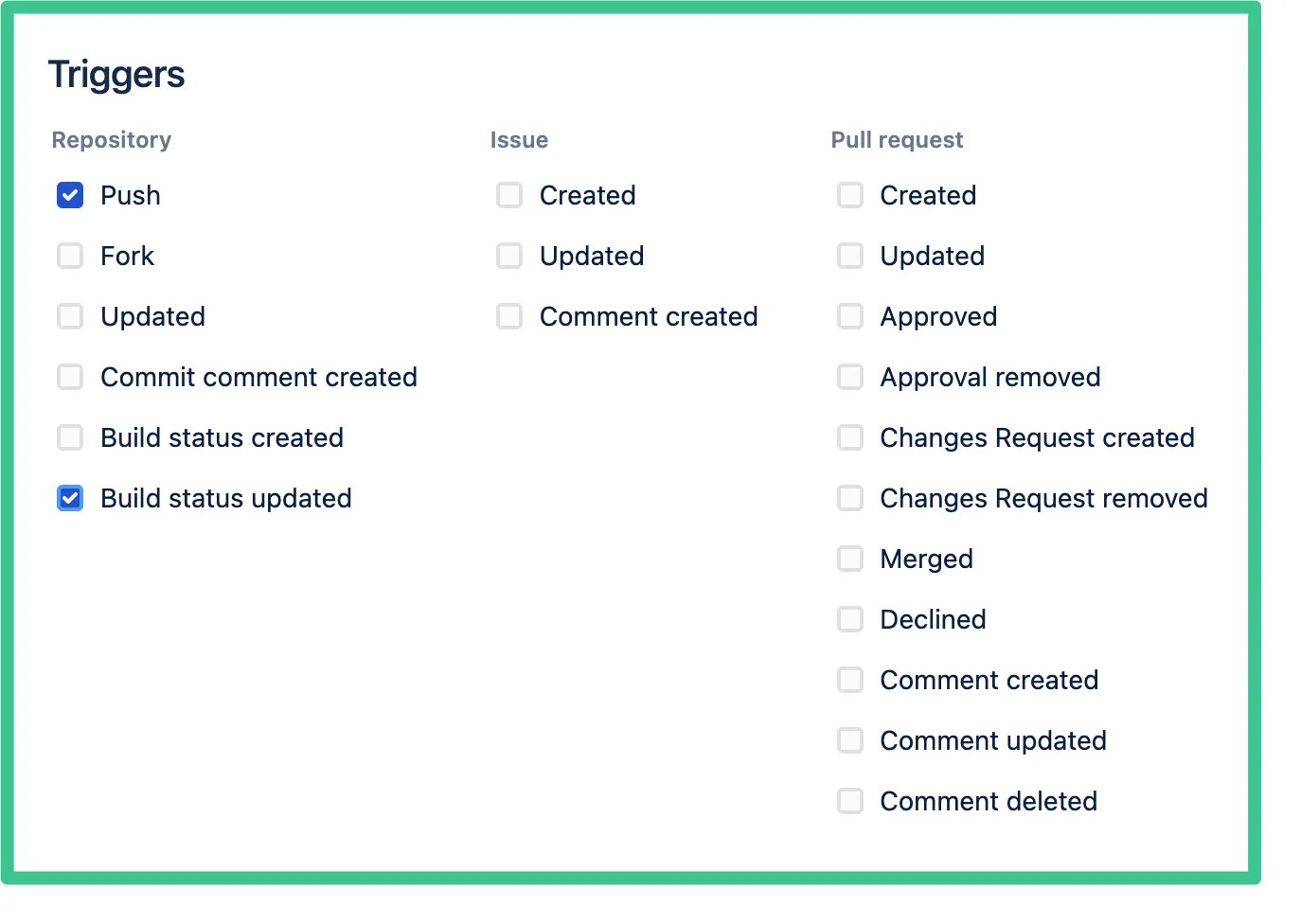](https://coralogix.com/docs/assets/images/Bitbucket-Triggers-972be56ab46dc78955e81850034e64f7.webp)
* On the right bottom, please click "Save".
## Send deployment events
Send each deployment to the Coralogix ops events API as well, and it appears as an [event marker](https://coralogix.com/docs/user-guides/apm/features/event-markers.md) on your APM charts, so you can line a latency or error-rate change up with the pipeline that caused it. This uses a Bitbucket Pipelines deployment step.
### What you need
* A **Send Your Data** [API key](https://coralogix.com/docs/user-guides/account-management/api-keys/api-keys.md#create-an-api-key) with the **OpsEvents** role preset. The ops events API rejects any other key type or preset, including the `CICDIntegration` key used for version tags, with `403 Forbidden`.
* The ops events endpoint for your Coralogix [domain](https://coralogix.com/docs/user-guides/account-management/account-settings/coralogix-domain.md). Use the domain selector at the top of this page to resolve it:
https\://ingress./v1/ops-events
* The service name and environment exactly as they appear in APM. They must equal the `service.name` and `deployment.environment.name` resource attributes your service reports. An event that matches no service is still stored, but appears only under **All events**.
### Add the event to your deployment step
Store the API key as a secured repository variable named `CX_OPS_EVENTS_API_KEY`, then add an `after-script` to your deployment step. `after-script` runs whether the step succeeds or fails, and `BITBUCKET_EXIT_CODE` is `0` when the step succeeded. The step image must include `curl`.
```
pipelines:
branches:
main:
- step:
name: Deploy to production
deployment: production
script:
- ./deploy.sh
after-script:
- SERVICE_NAME=
- if [ "$BITBUCKET_EXIT_CODE" = 0 ]; then STATUS=PIPELINE_RESULT_STATUS_SUCCESS; else STATUS=PIPELINE_RESULT_STATUS_FAILURE; fi
- if [ -n "$BITBUCKET_TAG" ]; then REF_TYPE=VCS_REF_TYPE_TAG; else REF_TYPE=VCS_REF_TYPE_BRANCH; fi
- |
curl -sS --fail-with-body -X POST 'https://ingress.eu2.coralogix.com/v1/ops-events' \
-H "Authorization: Bearer $CX_OPS_EVENTS_API_KEY" \
-H 'Content-Type: application/json' \
--data-binary @- <` with the service name from APM. The example takes the environment from the step's `deployment` keyword, so the Bitbucket deployment environment name must match the environment APM shows; otherwise replace `$BITBUCKET_DEPLOYMENT_ENVIRONMENT` with a literal value.
A successful request returns the server-generated event `id`. The marker then appears on the service's APM charts; see [Event markers](https://coralogix.com/docs/user-guides/apm/features/event-markers.md) for how to show it and for the full field reference. The API rejects a `timestamp` more than 24 hours from the time the request is received, so send the event from the pipeline as it runs rather than backfilling.
## Additional resources
| | |
| ------------------- | ------------------------------------------------------------------------------------- |
| Coralogix Endpoints | [Coralogix Endpoints](https://coralogix.com/docs/integrations/coralogix-endpoints.md) |